Stop Motion Science

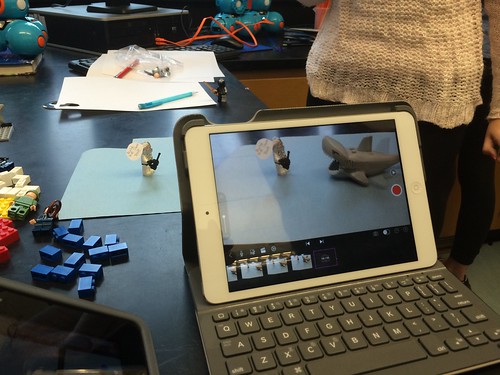
8Science students collaborated in the creation of a LEGO Stop Motion Video to demonstrate their understanding of substances and different types of Elements. They created a story line that included MONATOMIC ELEMENTS, DIATOMIC COMPOUND and TRIATOMIC COMPOUNDS!

New Blakers!

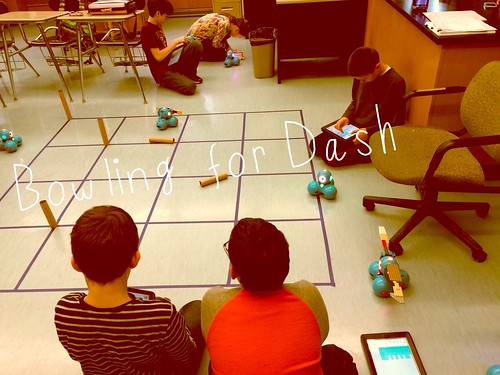
Welcome Dash and Dot! AfterSchool Coding Club members are test-driving the new robots which will soon be integrated into the Science curriculum.

Digital Learning Day 6th Discussion Panel

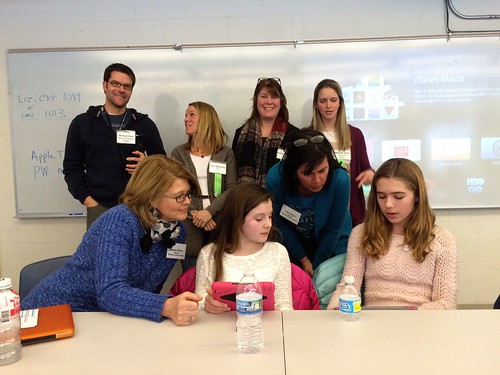
Medfield School District held its 3rd annual Digital Learning Day Conference filled with over 60 workshops for K-12 teachers in district and from schools out-of-district. Wellesley 6th Grade teachers joined Blake's 6th teachers and students for a discussion on their initial year of having 1:1 iPads in the classroom.

A Shout Out to Medfield HS/MS Student Volunteers

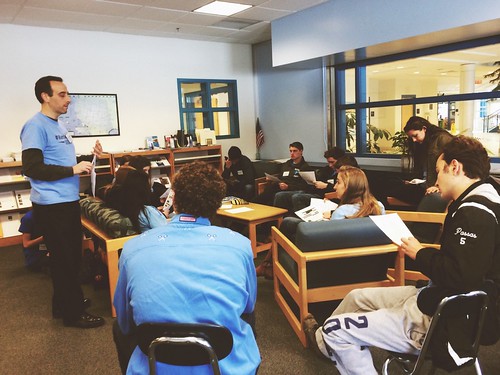
Our Digital Learning Day Conference wouldn't have been possible without the support of our wonderful Medfield HS Students and Blake MS students. This photo was taken at the beginning of the day, during a briefing with Neal Sonnenbergy (HS Tech Integration Specialist)

Look out for these future App Developers

This group of Blake MS girls are entered into the Global Competition, Technovation to design a mobile app that solves a community/social issue. Wish them Luck! The final pitch is on May 1st @ Microsoft NERD Center!

Took the Show on the Road

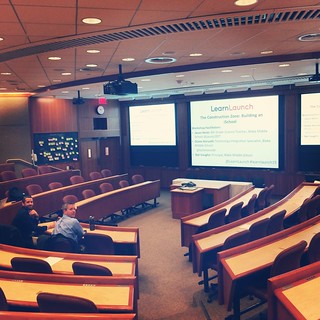
Blake MS Principal Nat Vaughn and 8Science Teacher Jason Heim presented about the Blake iPad Initiative at the LearnLaunch Conference, Harvard Business School.

Green Screen App Smashing

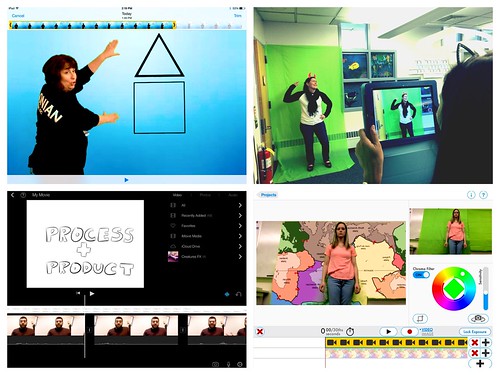
At our final EdTechTeacher Workshop, 6th/7th Grade Teachers explored their creative side by layering green screen videos over images for engaging instructional videos. It was total fun!

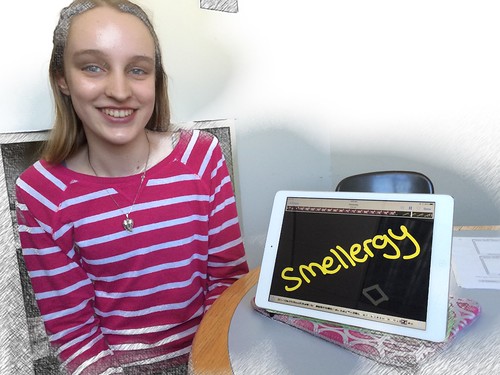
Convert Smells to Energy = Smellergy!

Nicolina is changing the world one nose at a time! Her entry was clearly on track with dreaming, designing, and delivering an energy-saving idea into the Blake Energy Invention Contest!

Sometimes the Ideas start here

Planning and drawing out a story board before the creation of an Explain Everything project is an essential step in the process!

9.20.2013

Medfield Goes Google Apps!


With the expansion of Medfield's mobile devices, the decision to go Google Apps for Education (GAFE) only made sense.  Google Apps allows school districts to create and manage teacher and student accounts to include their use of Gmail, Calendar, Docs and Site. More importantly, GAFE moves us to cloud-based solutions giving everyone more flexibility in accessing their files, sharing, and keeping track of homework, events, etc. through the google calendar from anywhere- on any device or internet-connection.

With the rollout of the 8th grade iPad and 9th BYOD initiatives and preparation for the 6th grade Koala cluster's Nexus Tablet pilot,  both teachers and students have received training in logging into their accounts and understanding how Google Apps plays a role in shifting to new ways of communication, workflow, and collaboration on the devices and via the web. 

Below Edudemic has informative blogposts on how to effectively integrate Google Apps into the classroom:  


FYI: GAFE is not intended only for students using mobile devices, all 6th graders -12th graders will have GAFE accounts within the next weeks. Any questions, please contact your school's principal.

9.02.2013

iPad Distribution Sessions..here we go!


Doors open for students on September 3rd! 

This year brings excitement in the expansion of the 8th iPad 1:1 pilot when it goes full scale to every 8th grader.  The initiative also moved towards a Bring Your Own Device model with options for Lease-to-Own and district devices available for any family with financial need. 

See documentation on the Launching iPads page


For families who chose the Lease-to-Own option, Blake MS offered three iPad Distribution Sessions for families to pick-up their iPads and to receive setup instruction prior to the start of school year in August.
  • Returned signed AUP and recorded the device's serial number
  • Connected to the school WIFI 
  • Logged into new Google Apps for Ed. account 
  • Created a non-credit card iTunes account to be used for school purposes only 
  • Downloaded a list of Starter Apps
Starter App List for the iPad Classroom

Below is a core list of apps students should install for the first week of school. Most of the apps are free. Explain Everything is the only paid app in which the district will provide a redemption code for students to download the app during the first week.


App Function Notes
Dropbox
Cloud Storage and Sharing of Files Students will use Dropbox to share files with teachers and other students.  
Evernote Note-taking Students will use this as their primary notetaking tool across classes.
Nearpod Interactive Multimedia Presentations Students will be further engaged in teacher-directed presentation activities by responding to poll questions, submitting drawings and taking informal assessments.
Google Drive Cloud File Storage,
Online, Collaborative Word Processing, Presentations and more.
Students will access Google Drive via a school GMail account and will use to create, store and share files.
Explain Everything* A screencasting, and interactive whiteboard tool that lets you record, annotate, animate, narrate & more. * This is a paid app which the District will provide for all students. Further instructions will be provided on how to download on the first day of school.
SkitchAnnotation and drawing app that supplements Evernote.Students will markup and annotate PDFs, images, maps, etc and send directly to Evernote.

Note for apps:
Once downloaded, please do not log-in or create accounts for these apps; this will be done at school.

Tips for being successful with the iPad:

  • Make sure your iPad is in your backpack in the morning when coming to school
  • Always bring your iPad fully charged to school; we recommend charging it at night when you are sleeping.
  • All your school related apps should be on the Home Screen of your iPad; all personal items should remain on other screens.
  • Your iPad should be in a case whenever it is in school
  • iPads should not be left in an unlocked locker or any unsupervised area; when in school your iPads should be stored in a locked locker.
  • iPads should not be used in gym, bathroom, halls, locker room, & lunchroom.
  • Make sure ‘Find my iPad’ is on.  This will allow your ipad to be located in case it is misplaced or stolen.   
  • Go to Settings>Privacy>Location Services>Find My iPad> On
As students set up a number of different accounts, understanding how to create a secure password will be important. Check out the following slideshow & click here for more tips.
How to Create (use use) Strong & Unique Passwords from ConnectSafely


The session ended with devices ready-to-go for the first day! Nat Vaughn, Blake MS Principal left families with the message of feeling comfortable reaching out for support.. from your peers, teachers, technology department and your administrators at any time. And, here we go!


8.23.2013

Fall in Line New Teachers for Technology Boot Camp!

Welcome!
All new teachers to Medfield participate in our Mentor and Induction Program for their first year. The program, developed by Kim Cave is designed to introduce new teachers to the culture of the schools, provide information about the professional assignment, and to provide continuous, non-evaluative collegial support throughout the first year in the district.

Prior to the first day of school, new teachers meet with district and building administrators. District administrators provide the district overview, a bus tour of the town and a cook-out social. Building administrators help acclimate new teachers to the building, provide information necessary for a successful first day, first week and beyond, as well as introducing new teachers to their colleagues.
That's not all.. for the first time, Medfield included a Technology Boot Camp as apart of those initial induction days.  Neal Sonnenberg and Diane Horvath, Technology Integration Specialist (TIS) led the 2 hour training session of learning how to log into the network, basic First Class email tutorials, Google Apps for Ed, School Dude technology-ticketing management system, Aesop for absence reporting and simply getting to your new technology besties, Neal & Diane!


The new group of teachers were so appreciative of the detailed instruction and in making sure they were able to access and log into all the essential technology tools. Now they'll be able to concentrate more on learning their new role and preparing for those first days of school. The Tech Boot Camp concluded their initial two-day induction as we wished them a wonderful school year! 


8.13.2013

Missed the Connected Learning Webinar? Catch the Recording Here!


If you missed the Connected Learning webinar:  Planning For Effective Teaching & Learning with Mobile Devices featuring our own Jason Heim as a guest speaker, here is the webinar recording below.


Watch live streaming video from connectedlearningtv at livestream.com


Stay Tuned for the Preparing Parents for Mobile Learning Webinar on Aug. 21st @4pm PST as our own Blake MS Principal, Nat Vaughn joins the panel of guest speakers such as Patrick Larkin, Carl Hooker and Scott Meech. Click here for more information.

8.03.2013

A Parent's Guide to 21st Century Skills


Too many times than not, administrators and educators throw around educational jargon that we assume everyone understands. As technology gains ever more importance and impacts our teaching and learning to prepare students for life, the term 21st Century Skills is alway mentioned-- that may leave you asking:

           What exactly are 21st Century Skills?  

Written as a Parent Guide, Edutopia explains the term, really concept as students develop through elementary, middle school and high school and offers tips to develop these skills at home. 
Take a look!