Stop Motion Science

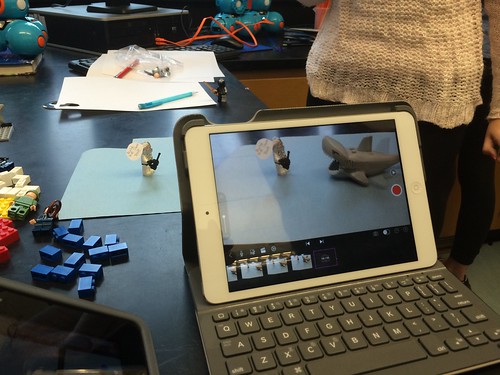
8Science students collaborated in the creation of a LEGO Stop Motion Video to demonstrate their understanding of substances and different types of Elements. They created a story line that included MONATOMIC ELEMENTS, DIATOMIC COMPOUND and TRIATOMIC COMPOUNDS!

New Blakers!

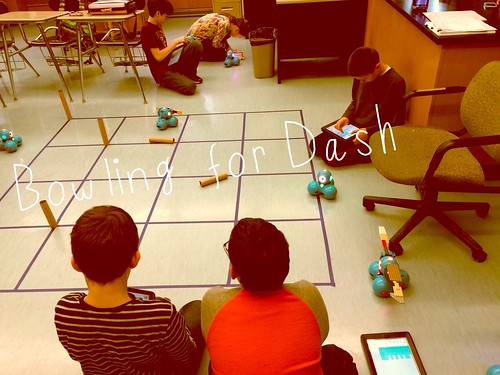
Welcome Dash and Dot! AfterSchool Coding Club members are test-driving the new robots which will soon be integrated into the Science curriculum.

Digital Learning Day 6th Discussion Panel

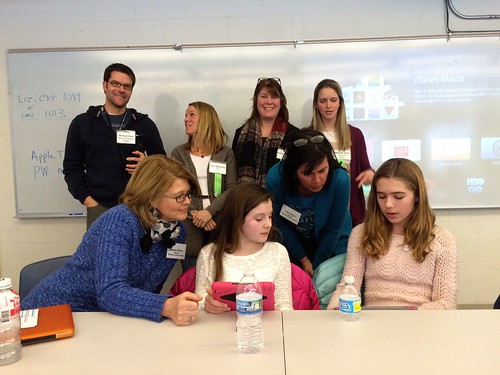
Medfield School District held its 3rd annual Digital Learning Day Conference filled with over 60 workshops for K-12 teachers in district and from schools out-of-district. Wellesley 6th Grade teachers joined Blake's 6th teachers and students for a discussion on their initial year of having 1:1 iPads in the classroom.

A Shout Out to Medfield HS/MS Student Volunteers

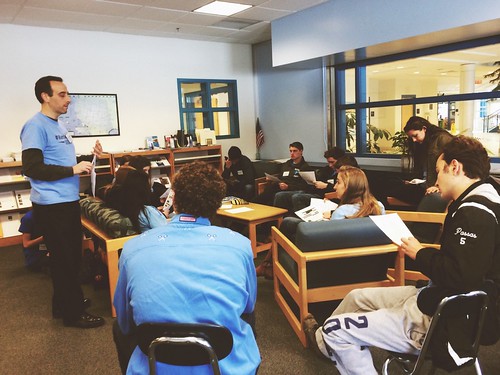
Our Digital Learning Day Conference wouldn't have been possible without the support of our wonderful Medfield HS Students and Blake MS students. This photo was taken at the beginning of the day, during a briefing with Neal Sonnenbergy (HS Tech Integration Specialist)

Look out for these future App Developers

This group of Blake MS girls are entered into the Global Competition, Technovation to design a mobile app that solves a community/social issue. Wish them Luck! The final pitch is on May 1st @ Microsoft NERD Center!

Took the Show on the Road

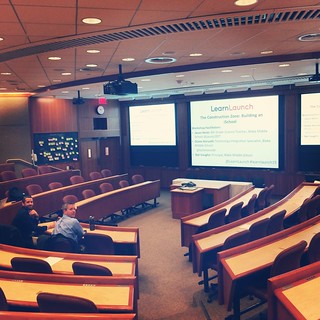
Blake MS Principal Nat Vaughn and 8Science Teacher Jason Heim presented about the Blake iPad Initiative at the LearnLaunch Conference, Harvard Business School.

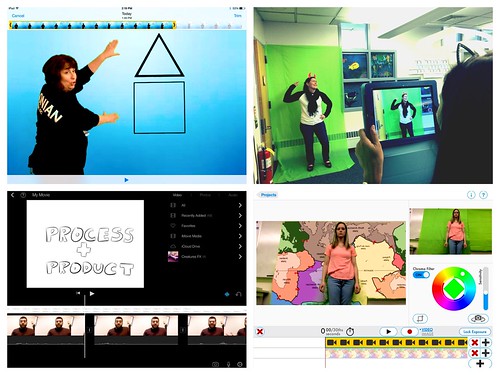
Green Screen App Smashing

At our final EdTechTeacher Workshop, 6th/7th Grade Teachers explored their creative side by layering green screen videos over images for engaging instructional videos. It was total fun!

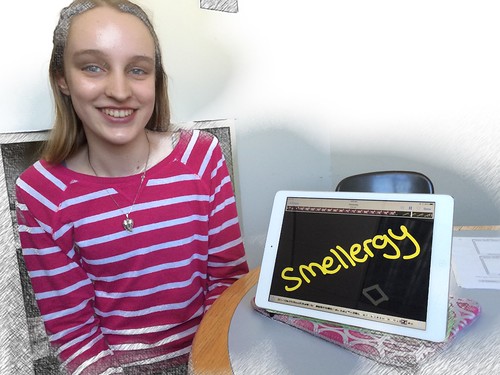
Convert Smells to Energy = Smellergy!

Nicolina is changing the world one nose at a time! Her entry was clearly on track with dreaming, designing, and delivering an energy-saving idea into the Blake Energy Invention Contest!

Sometimes the Ideas start here

Planning and drawing out a story board before the creation of an Explain Everything project is an essential step in the process!

6.12.2013

The iPads take a road trip to Medfield's Elementary Schools


Photo courtesy of Mr. Heim
While the 8th Graders were off to visit NYC/Washington DC, their iPads stayed behind and took a little trip themselves. Some of the elementary school teachers have been asking if they could experience teaching with the iPads too.  And...what better timing than to have a set of 25 iPads head over to Mrs. Lowerre's and Mrs. Cowell's fifth grade classrooms for a 1:1 experience at Dale Street School and a small set of 6 iPads to Mrs. Colatoni's and Mrs. Ravinski's first grade classrooms at Memorial and  Mr. Kuehl's third grade classroom at Wheelock.

Planning for iPad Integration
In each of those classrooms, the plan was to identify a curriculum project where  technology could offer a twist in enhancing or redefining the task. After determining the project, the discussion evolved into answering the question: What do we want student to be able to do?  Students should be able to show and talk about their work through illustrations, incorporate audio or video recordings, and type text and to share the presentation through their classroom's blog or website. We decided that the combination of a drawing and screencasting app would result in just that--a new, creative way for students to demonstrate their learning by adding the components animation, narration, and annotation to their illustrations!  Lastly, we scheduled blocks of time throughout the week as the project was broken down into two parts: drawing and animating/publishing to include classroom support.  

Check out their projects:

Mrs. Lowerre's 5th graders blast off into an animated Voyage of the Planets!

Designed on Tactilize (view online)

Mrs. Cowell's 5th graders developed into fabulous Poets 
using the TypeDrawing App, Sketchbook Express and Explain Everything.


Designed on Tactilize (view online)

Designed on Tactilize (view online)

Mr. Kuehl's 3rd graders presented a variety of food chains across different habitats.


Mrs. Ravinski's 1st graders created a BUZZ in sharing their Honey Bee expertise.


Mrs. Colatoni's 1st graders celebrated the American Patriotic Symbols!


By the end of the week, the teachers and support staff reflected on the process and product.

Some Key Take-Aways
  • Throughout the entire process, the teachers were impressed with the level of sustained engagement, problem-solving, and creativity during those times- by all students especially those students who typically struggle academically or with work perseverance.
  •  Students, particularly first graders quickly learned and understood the multiple steps to create the animations and the navigation of the iPad. Unbelievably!
  • The planning process of story boarding their slides for illustrations and written script and rehearsing their scripts as homework for fluency and expression made a significant difference in how students approached their projects and the amount of time to complete.
  • In the past, elementary teachers, primarily K-3 would send their students to the computer lab for technology projects. However, even without WiFi, the iPads enabled students a chance to remain in their classrooms, at their desks or move around to a more conducive workplace to record their project. 
  • The real challenges were on in finding apps that did not require an internet connection, but more around figuring out the best workflow for organizing & merging projects into one presentation, exporting as a movie and uploading into a shared dropbox, and identifying the best Web 2.0 tools for hosting/showcasing the students' work (ie. Flickr, Tactilize, Vimeo, Youtube) were the bigger challenge. This was more on the teacher end of it. However, maybe next time integrating these challenges for fifth graders to learn how to problem-solve using a variety of tools. 
Overall, as this was a first experience for both teachers, students and myself, the iPad as a portable, creativity-publishing tool truly pushed students' higher-order thinking and not to mention, increased their own personal technology skills and their enjoyment in the entire learning process. Since then, students have been asking, "When can you bring the iPads back to my classroom?"  Hopefully, soon!


5.26.2013

iCal & the 8th Grader


One of the first significant differences the iPad has made in the school life of an 8th grader is in learning organization and time management skills using the iCal app in place of a paper agenda book.


Just think... No longer are there torn or missing pages from the agenda.  No longer is their agenda misplaced or found crumbled and shoved into a backpack. In fact, with the combination of syncing Google Cal with iCal, the star cluster teachers make it pretty hard for students NOT to know about assignments and their due dates. The star cluster teachers actually created a shared calendar with every single 8th grader.  Now, the teachers can post long term assignments, field trips, reminders and much more on all calendars with a tap of a sync button. They can also be mindful in planning around each others testing dates and big project deadlines too.

Believe me, this doesn't let the students off the hook for maintaining their own calendars. The responsibility still remains theirs for adding daily homework events and any other important information. The school also encourages families to set up their own shared calendar for after school sports, family events, and their scheduling needs.


Leave it up to students to figure out additional ways to make the calendar their 'own". One of the teachers discovered that some students were 'checking off' finished assignments with hearts!  (Click on the above screenshot of an actual 8th grade iCal to biggify.)  This student was using the Emoji keyboard to type in the HEARTS! Clever!


Other students take advantage of the camera app to snap a photo of the assignments written on the board to then later add to their iCal.  This is particularly helpful as an accomodation for students who struggle with writing or have motor skill deficits to keep up with the pace of the class.  Multiple calendars can also be created and color coded to easily distinguish between them. Events can have alerts and visual reminders set up for deadlines. These simple features are really beneficial to all users!

More information on iCal tips and tricks, try the following resources:
Keyboard Fun in a Nutshell
Syncing Google Cal with iCal
Setting up the Emoji Keyboard on your iPad
5 Superb iCal Tips to increase your Productivity
Video Tutorials of a variety of iCal tricks
iPad Basics for Everyday Tasks


If you have questions, feel free to leave a comment.

4.13.2013

Slow Motion Science

Let's face it- there is nothing that can replace a student conducting their own hands-on Science experiments!
This pretty much still holds true in a 1:1 iPad environment.  In fact, the iPad actually takes the back seat and serves a very different purpose in these situations. Plus, you only need ONE!


Enter into Mr. Heim's 8th Science Class.
His students usually work in partners for experiments. However, the Flame Test is the one test that requires more safety procedures to be in place. Therefore, Mr. Heim takes the lead in conducting the only experiment which means most students will have to watch from a safe distance.  Can you imagine being the student sitting in the back of the class? Maybe you were absent that day?  Or the experiment happens so fast that you missed the most important part?  

Well, Mr. Heim discovered a solution to these challenges. He simply found a stand to hold his device near the experiment and the Slo Pro iPad app to record & replay the entire process in slow motion as many times as needed. 

Watch the video below to join his class in action.

*You will also notice students then documented the results by hand-drawing a chart and explaining their observations in the Explain Everything app. This makes it possible for students to later return to their own audio-visual recording of the results.   Think of how beneficial is it to be able to watch and listen to your own explanation at any time too?

Without further ado...The Flame Test!


Let's take this one step further... 
Do you think all of the Science classes had the same experience?  
Reached the same results? 
Drew the same conclusions? 

Maybe. Maybe not.
Mr. Heim now has the ability to share each recording
with each class to draw their own conclusions.

 My conclusion:  Science in slow motion can be a powerful tool!

4.02.2013

Vintage Social Networking

Parents & Teachers,


Social media has actually been around for a long time..
who knew?!
Although it looked more like this!


The difference is how it has evolved into connecting and sharing in a more public way.
While this opens up and offers opportunities to learn from others educationally 
and personally,  it is important that we have a solid understanding of social networking
and how our students /children are using them. 

Please take time to read:

3.31.2013

Journey to the Center of the Earth

Screencasting gives students a tool to demonstrate creativity and collaboration.


8th Grade is filled with some adventurous field trips .. this latest one takes you directly to the Center Center Center of the Earth Earth Earth!

Grab your astrosuit and climb aboard as two 8th graders narrate your journey through the Earth's Crust, Mantle, Outer Core, Sub Layers and  Inner Core. 


Typically, Mr. Heim's students complete a web quest to answer questions as a way to demonstrate their learning.  However, with the iPad, the screen casting app, Explain Everything opens up other possibilities that push students to use creativity in writing a script, in finding images to match their information and in producing an animated movie. This activity also involved a tremendous amount of collaboration through discussion/communication, research, decision-making and the creation process. The end result.. you have students who not only met the learning objectives, but who were able to successfully complete a higher order complex task in an engaging, purposeful way.