Stop Motion Science

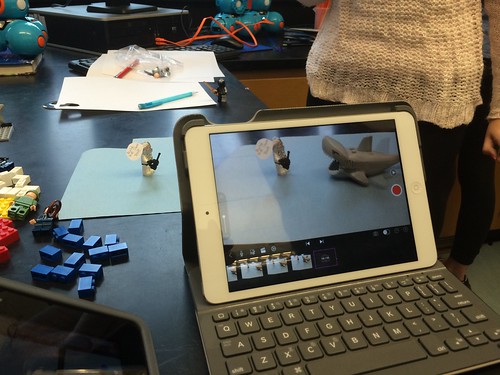
8Science students collaborated in the creation of a LEGO Stop Motion Video to demonstrate their understanding of substances and different types of Elements. They created a story line that included MONATOMIC ELEMENTS, DIATOMIC COMPOUND and TRIATOMIC COMPOUNDS!

New Blakers!

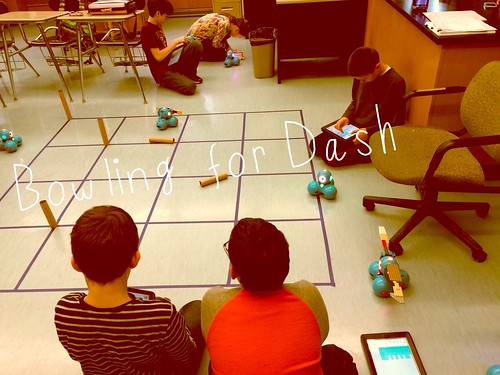
Welcome Dash and Dot! AfterSchool Coding Club members are test-driving the new robots which will soon be integrated into the Science curriculum.

Digital Learning Day 6th Discussion Panel

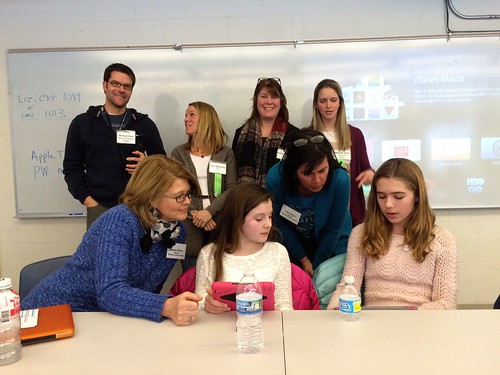
Medfield School District held its 3rd annual Digital Learning Day Conference filled with over 60 workshops for K-12 teachers in district and from schools out-of-district. Wellesley 6th Grade teachers joined Blake's 6th teachers and students for a discussion on their initial year of having 1:1 iPads in the classroom.

A Shout Out to Medfield HS/MS Student Volunteers

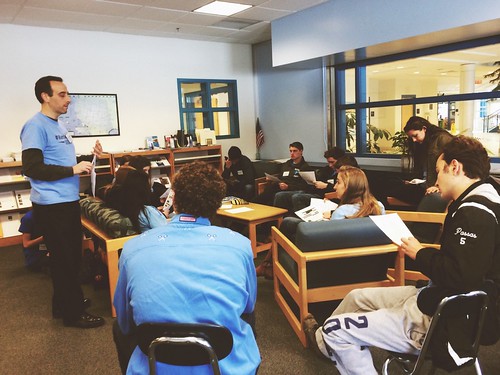
Our Digital Learning Day Conference wouldn't have been possible without the support of our wonderful Medfield HS Students and Blake MS students. This photo was taken at the beginning of the day, during a briefing with Neal Sonnenbergy (HS Tech Integration Specialist)

Look out for these future App Developers

This group of Blake MS girls are entered into the Global Competition, Technovation to design a mobile app that solves a community/social issue. Wish them Luck! The final pitch is on May 1st @ Microsoft NERD Center!

Took the Show on the Road

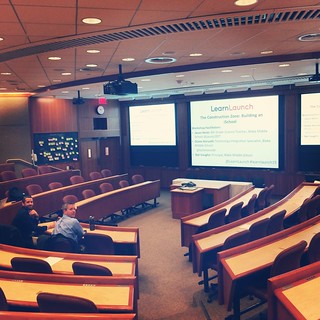
Blake MS Principal Nat Vaughn and 8Science Teacher Jason Heim presented about the Blake iPad Initiative at the LearnLaunch Conference, Harvard Business School.

Green Screen App Smashing

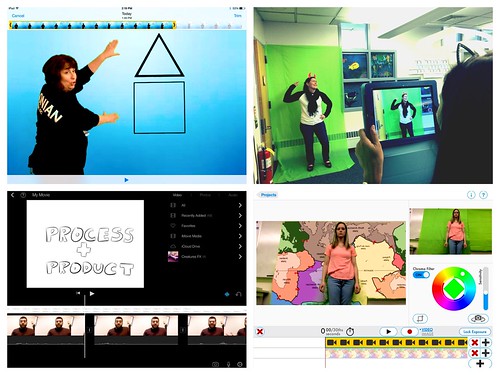
At our final EdTechTeacher Workshop, 6th/7th Grade Teachers explored their creative side by layering green screen videos over images for engaging instructional videos. It was total fun!

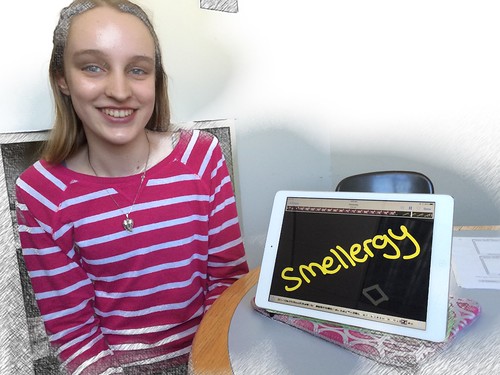
Convert Smells to Energy = Smellergy!

Nicolina is changing the world one nose at a time! Her entry was clearly on track with dreaming, designing, and delivering an energy-saving idea into the Blake Energy Invention Contest!

Sometimes the Ideas start here

Planning and drawing out a story board before the creation of an Explain Everything project is an essential step in the process!

Showing posts with label student work. Show all posts

11.02.2013

Early transformation of the Russian Icon project!

Eighth grade begins the shift in the Massachusetts' Social Studies Curriculum Frameworks towards learning about World History. Medfield students begin their year examining Russian civilization. This includes a visit to the Museum of Russian Icons located in Clinton, Ma. to help students understand the role that icons played in the lives of Russians.

In years past,  the assignment was for students to bring their worksheet and a pencil to complete a scavenger hunt while touring the museum.  This year, with iPads in hand, they could capture their "answers" and easily refer back to the powerpoint slideshow  (which was accessible on their device) as a reference for more information.


 In addition, students were now able to capture their experience by snapping photos and videos which were incorporated in their follow-up collaborative group project.  The project had to include at least 5 of 11 images stating the significant fact of each. Students were given leeway to use any of the following apps:  TouchCast, Telligami , Explain Everything or any combination to produce their project and share it with their teacher via Google Drive/ email the link.

These are a few fantastic examples:


With the TouchCast app, Py and Joe pulled in their videos & pics while recording their
video of themselves (reading from a built-in app prompter).  Other elements can be pulled into the app too such as twitter feeds, webpages, and more offering a real 'newscaster' production.


Telligami has really caught the attention of our 8th graders as
most are hesitant to record and listen to their own voices or see themselves in a video.
(Who can blame them, I am the same exact way!) Telligami's avatar 
option has been a wonderful work around /alternative!
(For other Talking Avatar apps: Click Here)

These are also examples of how learning is being transformed across that SAMR model line to more of a modification and redefinition use of technology than purely substitution. Bravo!

Thanks to 8th graders and to our Social Studies teachers, Mrs. McClelland, Mr. Sullivan and Mr. Taliaferro for sharing their work and projects.


3.31.2013

Journey to the Center of the Earth

Screencasting gives students a tool to demonstrate creativity and collaboration.


8th Grade is filled with some adventurous field trips .. this latest one takes you directly to the Center Center Center of the Earth Earth Earth!

Grab your astrosuit and climb aboard as two 8th graders narrate your journey through the Earth's Crust, Mantle, Outer Core, Sub Layers and  Inner Core. 


Typically, Mr. Heim's students complete a web quest to answer questions as a way to demonstrate their learning.  However, with the iPad, the screen casting app, Explain Everything opens up other possibilities that push students to use creativity in writing a script, in finding images to match their information and in producing an animated movie. This activity also involved a tremendous amount of collaboration through discussion/communication, research, decision-making and the creation process. The end result.. you have students who not only met the learning objectives, but who were able to successfully complete a higher order complex task in an engaging, purposeful way.

3.14.2013

The Renaissance Comes Alive!

A Formal Invitation to the Renaissance Dinner Party
  in Mrs. McClelland's 8th Social Studies Classroom


In  past years, Mrs. McClelland's students were asked to culminate and apply the information and knowledge they had learned about leading Renaissance figures by writing an essay.  The essay had to describe the seating arrangement and conversations occurring between each figure if they were to attend a Renaissance feast.  Therefore, students were to consider each guests' language, personality, training, and achievements so that everyone has something to talk about with nearby guests at the table. This type of assignment proved to be a challenging task both for students in fully integrating each factor into a written explanation but also, for the teacher in grading each essay.


This year was different!  The timing for our professional development iPad workshop with Greg Kulowiec of EdtechTeacher could not have been better.  The workshop introduced the SAMR model and pushed our thinking to redefine a particular curriculum unit or lesson with technology to create new tasks that were previously inconceivable.

Poof! The redefinition of the Renaissance Feast was born!  
Students were to collaborate in small groups in creating a screen cast using the Explain Everything app. As a group, they were to demonstrate the different possible seating arrangements visually with actual images while recording their explanations. The newly redefined version of the assignment proved to be successful.


Wait, there's more....
The rethinking of how students learned about the leading Renaissance figures did not begin or end here.  In previous years, students read from the textbook and often confused the names of the individuals and facts. The Funny Face Maker app actually brought these figures to life! Students were more engaged to hear from 'a living museum' of characters.


This process involved students working with partners to watch each movie clip and to take notes on a graphic organizer provided on paper.


At the end of their research, students choose a Renaissance figure to debate who was the most influential of that era. Students had the opportunity to create their own ' Living Figure' with the Funny Face Maker app to present the beginning of their argument.


No iPads needed... Learning activities are not designed solely to use the iPad. There are times when hands-on activities are best. The Renaissance lends itself perfectly for that. Of course, Mrs. McClelland incorporated a little artistic experience into the unit to let students 'become Michelangelo" by painting the ceiling of the Sistine Chapel which of course, looked like this! 


The iPad offered Mrs. McClelland ways to enhance and redefine curriculum that was not possible before. The results were students having success in accessing, learning and demonstrating their new knowledge of the Renaissance Era.

2.15.2013

Student Work: Explaining Everything about Paragraphs

Paragraph Comparisons
Mr. The Hellerstein's class has spent several weeks reading and discussing the book, The Crucibles.  Part of the literacy unit included time examining good paragraph writing in preparation when they will write their own essay.

When given two paragraphs, Mr. Hellerstein challenged his students to answer the question: Can you spot the better paragraph?

To complete the task using their iPad, students followed this work flow:

1. Get Assignment:  Get the digital copy of the two paragraphs from Mr. Hellerstein's shared class Dropbox folder.

2. Complete Assignment: Open in the screencasting app, Explain Everything.  Record explanation by narrating and marking up the paragraphs.

3. Turn in the Assignment: Export their movie directly from the Explain Everything app to the student's own Dropbox folder shared with Mr. Hellerstein.


Explain Everything is a screencasting app that allows students to demonstrate their knowledge and learning through visuals, narration and annotating the screen. In these examples, students 'explain' their comparsions of the two paragraphs with details supporting their decision.


2.12.2013

Student Work: Defining Terms

LITERACY: DEFINING TERMS


In English Class, the book, The Crucible was filled with symbolism.  Therefore understanding many terms, like Communism and Theocracy helps students build a foundation and background knowledge before they even begin reading the book.

This 8th grade student used Educreations, an interactive whiteboard app to describe his understanding of the two terms.

Click here to view his movie: Communism and Theocracy


(Educreations movies upload and are hosted directly to that website- Students are also able to create Educreations movies on the website itself, rather than the iPad. To share his work, he emailed the link to his movie to Mr. Hellerstein)

Student Work: Charles Law by Shakespeare


Check out the work created by Medfield students:  
Using the Puppet Pals App to learn about Charles Law

Typically to assess students' learning about a science concept, they're given the usual multiple choice /short answer quiz.  Not this time!  With iPads in hand and the Puppet Pal app, students were given the opportunity to expand and to push their imagination by developing a short animated puppet movie instead.


Who knew Shakespeare, Abraham Lincoln and science went together?!  
Watch how these eighth graders create a unique way of explaining their knowledge.

2.11.2013

Express Yourself

An example of a student's use of drawing on the iPad.